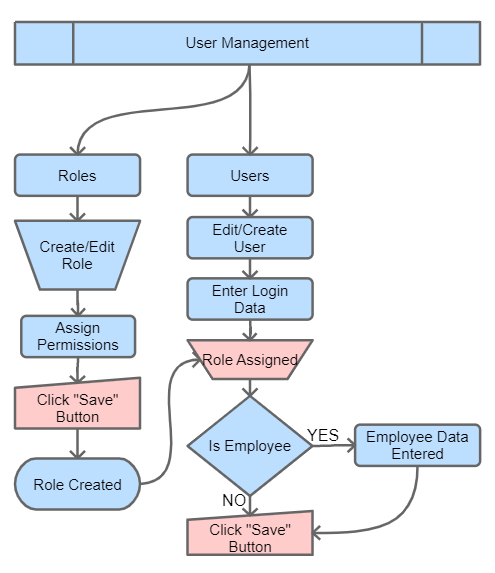
User Management in DaaI Business Suite allows you to control access to the system and define what each user can do. In the sidebar this group is labelled Users, and it contains two modules that together govern who can sign in and what they can do.
This section includes two main modules:
- Roles (
/daai/authorities):- Used to create and configure permission templates.
- Each role defines which modules a user can access and what actions they can perform.
- Users (
/daai/users):- Used to create user accounts (employees and non-employees alike).
- Assign one or more roles to control access and permissions.
By combining roles and users, you can enforce strict access control and manage responsibilities across the organization.
🔑 Two-Step Access Pattern
- Define a Role with the right module-level permissions.
- Create / edit a User and assign one (or more) roles.
📌 User vs Employee — Module Split
The Users module captures user-account fields (login, role, password, profile photo, active flag). When Is Employee is ticked on a user, the same record drives the HRM > Employee aside, where employee-specific data (designation, salary, department, exit, etc.) is edited. Both modules round-trip the other side’s data — you can edit from either entry point and the change is reflected on both screens.
📚 Articles in this section
- Roles
- Users