

🧾 What is CRM?
CRM stands for Customer Relationship Management. It is a system that helps businesses manage their interactions with potential and existing customers. It stores all the customer details in one place and helps the sales team track who they are talking to, what stage the conversation is in, and what needs to be done next.
💡 Why Choose DAAI CRM?
- ✅ Simple & Easy to Use: No confusing words or unnecessary features. Any new user can learn it quickly with minimum training.
- ✅ Focused on Follow-ups: Built to help your sales team keep in touch with leads and close more deals, not just organize data.
- ✅ Clear Visibility: Instantly see the status of each lead, prospect, or opportunity without digging through menus.
- ✅ Quick Follow-Up Form: Dedicated follow-up form lets you update next steps fast, without navigating to multiple pages.
- ✅ Kanban View: Visual board where you can drag and drop leads to change their status quickly.
- ✅ Powerful Reporting: Instantly view reports on leads, sales progress, and revenue.
- ✅ Smart Auto-Promote: Leads move forward automatically based on specific actions — no need to do it manually.
- ✅ Sales Force Automation: Reduces manual work and saves time.
- ✅ Customization Options: Designed to fit different industries and business types.
- ✅ Strong Permission Control: Only authorized team members can view or manage leads and opportunities.
- ✅ Simple Lead Qualification: Easy process to identify high-quality leads — just tick three checkboxes to move forward.
🧩 CRM Modules
- Leads — raw, unverified contacts.
- Prospect — leads being actively followed up.
- Opportunity — qualified deals in the sales pipeline.
- Followups — unified follow-up queue drawn from Prospects + Opportunities.
- Support — internal ticketing for clients and internal teams (lives in the same CRM sidebar group).
📝 DAAI CRM Workflow
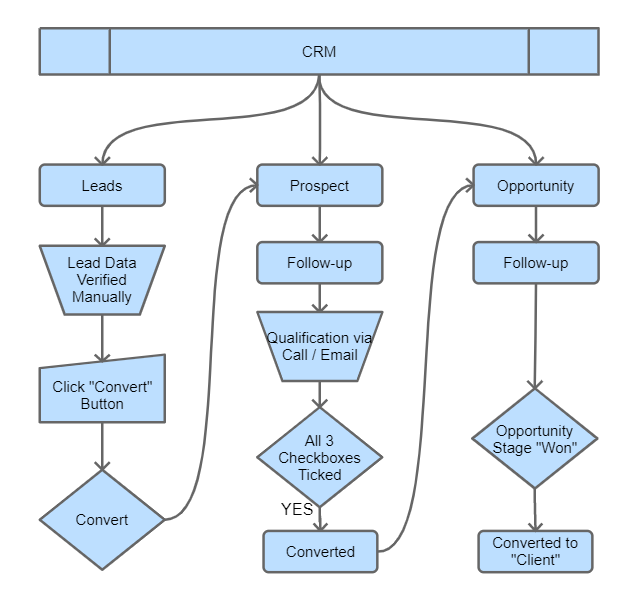
In DAAI CRM, the process works in a smooth and easy flow:
- First, you add the basic contact details of leads (raw or new inquiries).
- As you start working on those leads, you move them to the “Prospect” stage to check if they qualify.
- If a prospect passes 3 main qualification checks, the system automatically converts it into an “Opportunity.”
- When you successfully close a deal and mark it as “Won,” that record automatically becomes a Client in the Billing module.
- Both Prospect and Opportunity modules come with:
- Kanban View (drag-and-drop system for easy tracking)
- Follow-up View for managing ongoing communications.
In DaaI CRM, the process of managing leads to clients is designed to be simple, clear, and automated. Here’s how it works step-by-step:
🔄 CRM Flow
1️⃣ Add Leads
- Start by adding basic contact details in the Leads module.
- This is where you capture new inquiries or raw leads.
2️⃣ Verify Leads
- Review each lead and ensure it has complete and correct data.
- Once verified and ready, proceed to the next step.
3️⃣ Convert to Prospect
- Move the lead to the Prospect stage by converting it from the Leads module.
- In the Prospect stage, begin qualification checks.
4️⃣ Lead Qualification in Prospect
- In the Prospect module, perform the 3 main qualification checks:
- Client Needs Our Service/Product
- We Can Serve the Client
- Client Has the Budget
- If all 3 checks pass, the system automatically converts Prospect → Opportunity.
5️⃣ Manage Opportunity
- In the Opportunity module, you manage deals actively through stages such as Requirement Gathering → Preparing Quote → Quote Submitted → Negotiation → Won.
- If an Opportunity is marked as Won, the record is automatically converted to a Client in the Billing module.
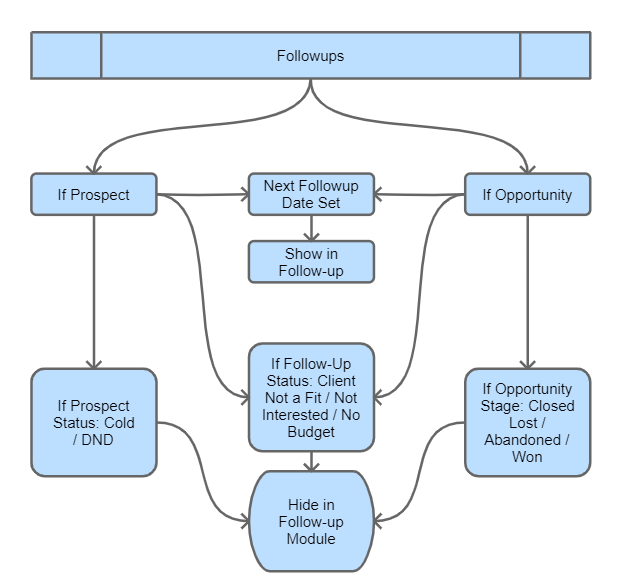
📞 Follow-Up Module
- Leads from both Prospect and Opportunity modules are automatically listed in the Followup Module.
- This helps you manage ongoing communication and next actions.
👀 Views Available
- Kanban View → Drag-and-drop for easy visual tracking (Prospect + Opportunity + Followups).
- Follow-Up View → Focused view to manage and plan follow-up actions.
- List/Grid View → Sort, filter, and run bulk actions across records.
Urgency-Bucket Filters (Kanban)
Across the Prospect, Opportunity, and Followups kanban boards, you can filter records by urgency bucket so you focus on what matters today:
- Delayed — follow-up date has already passed.
- Today — due today.
- Upcoming — due in the next few days.
- Future — scheduled further out.
- Stalled — no follow-up date set or no recent activity.
💡 Tips
- Pipeline order: Leads → Prospect → Opportunity → Client.
- Followups run across Prospect & Opportunity as the active communication manager.
- Important Rules for Followups:
- ❌ Prospect Status Cold / DND → Will not appear in Followups.
- ❌ Followup Status = Not Interested, Client Not a Fit, No Budget → Will not appear in Followups.
- ❌ Opportunity Stage = Closed Lost, Abandoned, or Won → Will not appear in Followups.
- An Opportunity marked as Won will create a record in the Client module under Billing.