

🧾 What is a Prospect?
A Prospect is a Lead who has shown interest, is being actively followed up with, and is under evaluation to determine if they’re a good fit for your product or service. Prospects are the middle stage between a raw Lead and a formal Opportunity.
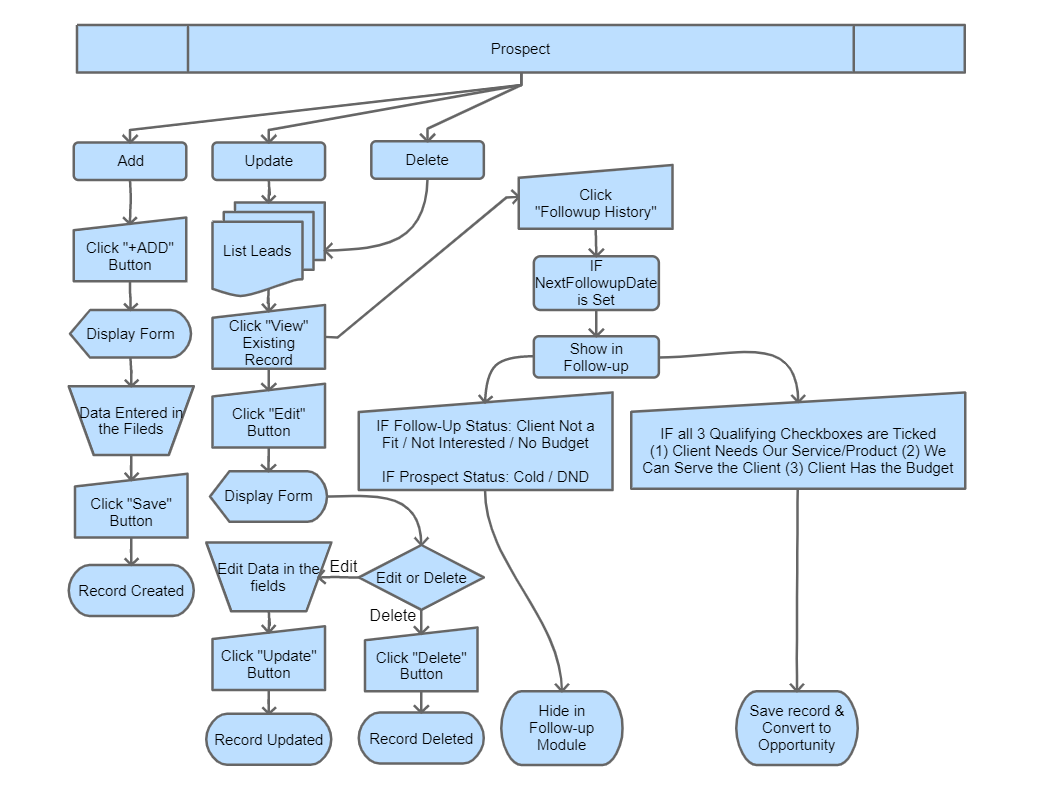
🎯 Purpose of the Prospect Module
- Primary focus: To qualify leads through structured follow-ups by evaluating:
- Does the client have the budget? (Client Has the Budget)
- Can we serve the client with our offerings? (We Can Serve the Client)
- Does the client need our service/product? (Client Needs Our Service/Product)
- To ensure only relevant leads are converted into Opportunities.
- To follow up any prospect to continue qualification or push them toward becoming an Opportunity.
- To provide a clear follow-up process and visibility on lead engagement. Each Prospect is tagged with a different color based on Prospect Type — Hot (red), Warm (yellow), Cold (blue), DND (grey).
- To minimize junk opportunities and improve sales team focus.
🛠️ Main Actions in the Prospect Module
- Create new Prospects manually or convert from Leads.
- Edit or delete any prospect.
- Add or update follow-up status via the Follow-Up form.
- Switch the prospect view between Kanban Board and Grid/Table view.
- In Kanban, change follow-up status or prospect type by drag-and-drop.
- Track communication history through the Followup History form (tab inside the prospect detail).
- Auto-convert qualified Prospects into Opportunities when all three qualification criteria are met.
- Attach documents and internal notes.
- Export prospect records to CSV/Excel.
⏱️ When Should You Prospect a Lead?
- There is a clear expression of interest from the lead.
- Your team has conducted basic qualification (need, fit, budget).
- You are ready to start follow-ups or evaluations.
- The Lead requires more than one round of interaction before a quote or proposal.
🔁 Auto-Conversion to Opportunity
Once you tick all three qualification checkboxes — Client Needs Our Service/Product, We Can Serve the Client, and Client Has the Budget — the system prompts you for a couple of extra details required for an Opportunity (typically Estimated Cost and Project Description) and then converts the prospect to an Opportunity automatically. Conversion is not silent; you confirm the deal-level details first.
🎯 Urgency-Bucket Filters (Kanban)
On the Prospect Kanban board, you can filter prospects by urgency bucket so the focus stays on what’s due now:
- Delayed — follow-up date has passed.
- Today — due today.
- Upcoming — due in the next few days.
- Future — scheduled further out.
- Stalled — no follow-up date set or no recent activity.